Debian repository
To install the ted Debian repository on Debian or Ubuntu, and receive automatic updates, run
sudo sh -c 'curl https://ted.pommicket.com/install-repo.sh | sh'
Then to install ted, run
sudo apt update
sudo apt install ted
Or install ted-static-sdl if the libsdl3-0 dependency is not found.
Download version 3.2.7
- Debian/Ubuntu x86-64 (.deb)
- Debian/Ubuntu x86-64, static SDL (.deb)*
- Microsoft Windows® x86-64 (.msi)
- Source code (.tar.gz)
* use the static SDL version if you get a libsdl3-0 missing dependency message with the normal .deb
Why?
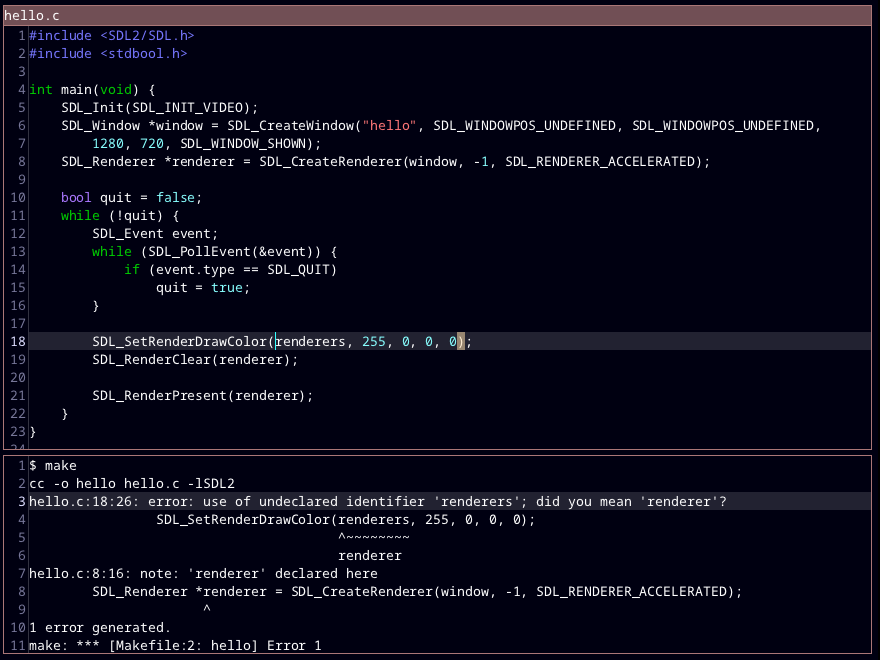
There are a lot of text editors out there. ted doesn't do anything new. Here are some benefits of ted:
- Starts up immediately.
- Doesn't lag for reasonably-sized files.
- VERY small - a full ted installation is < 5 MB.
ted isn't incredibly complicated, but it does have some nice features you might not find in other editors.
Supported features
- Customization of (pretty much) all colors and keyboard commands.
- Basic text editing like copy+paste, undo+redo, etc.
- Multiple tabs, each with a different file
- Split screen
- Auto-indent
- Syntax highlighting for C, C++, C#, CSS, GdScript, GLSL, Go, HTML, Java, JavaScript, LaTeX, Markdown, Python, Rust, and TypeScript.
- Find and replace (with regular expressions!)
- Run build command, go to errors
- Run any shell command
- Autocomplete
- Go to definition
- Go to line number
- Indent/dedent selection, comment/uncomment selection
- Keyboard macros
Building from source
Download ted's source code, then
run git submodule update --init --recursive to download ted’s dependencies.
To install ted from source on Linux, you will also need:
- A C compiler
- The SDL3 development libraries
- cmake
- imagemagick convert (for creating the .deb installer)
These can be installed on Ubuntu/Debian with:
sudo apt install clang libsdl3-dev cmake imagemagick
Then run make -j ted.release to build then sudo make install to install.
You can also run make -j ted.deb to build the .deb installer.
If your operating system is old enough that it doesn’t have an SDL3 package,
you can also build a version with SDL3 statically linked in, using
make -j ted-static-sdl.release, then install with sudo make install-ted-static-sdl.
This installs ted for all users. If you just want to install it for yourself (or you don't have superuser access), you can do so with
mkdir -p ~/.local/bin ~/.local/share
GLOBAL_DATA_DIR='~/.local/share/ted-data' INSTALL_DIR='~/.local' make install -j
On Windows, install Microsoft Visual Studio 2026, then find and add vcvarsall.bat to your PATH
(most likely lives at C:\Program Files\Microsoft Visual Studio\2026\Community\VC\Auxiliary\Build).
Also, install the Visual Studio Installer Projects extension
(needed to build the .msi installer).
Next you will need the SDL3 VC development libraries: https://github.com/libsdl-org/SDL/releases (named SDL3-devel-3.x.y-VC.zip;
you might have to click "show all assets").
Extract the zip, copy SDL3-3.x.y into the ted directory, and rename it to SDL3. Also copy SDL3\lib\x64\SDL3.dll
to the ted directory.
Then run make.bat release.
License
ted is in the public domain (see LICENSE.txt).
Reporting bugs
You can report a bug by sending an email to pommicket at pommicket.com
or by creating an issue on GitHub.
If ted is crashing on startup try doing these things as temporary fixes:
- Delete
~/.local/share/ted/session.txtorC:\Users\<your user name>\AppData\Local\ted\session.txt - Reset your ted configuration by moving
ted.cfgsomewhere else.